
Institutional Review Board (IRB)
Institutional Review Board ∙ irb@umd.edu ∙ 301-405-4212 ∙ 1204 Marie Mount Hall ∙ Hours: 8:30 AM - 4:30 PM
Welcome to the Institutional Review Board (IRB) Office

- What is an IRB?
- Review Paths
- IRB Composition
- Federalwide Assurance
- Standard Operating Procedures and Policies
- Full Board Meeting Dates and Deadlines
What is an IRB?
An Institutional Review Board (IRB) is a committee that performs ethical review of proposed research to help assure the protection of the rights and welfare of human participants. The IRB approves the initiation of and conducts periodic reviews of research involving human participants. Investigators also share the responsibility for protecting human participants.
To submit an application please visit IRBNet.
If you do not have an account, go to IRBNet, then click “New User Registration” in the upper right hand corner and follow the instructions. Your IRBNet account is NOT linked to your UMD ID.
For more information on how to submit via IRBNet, please click here.
Review Paths
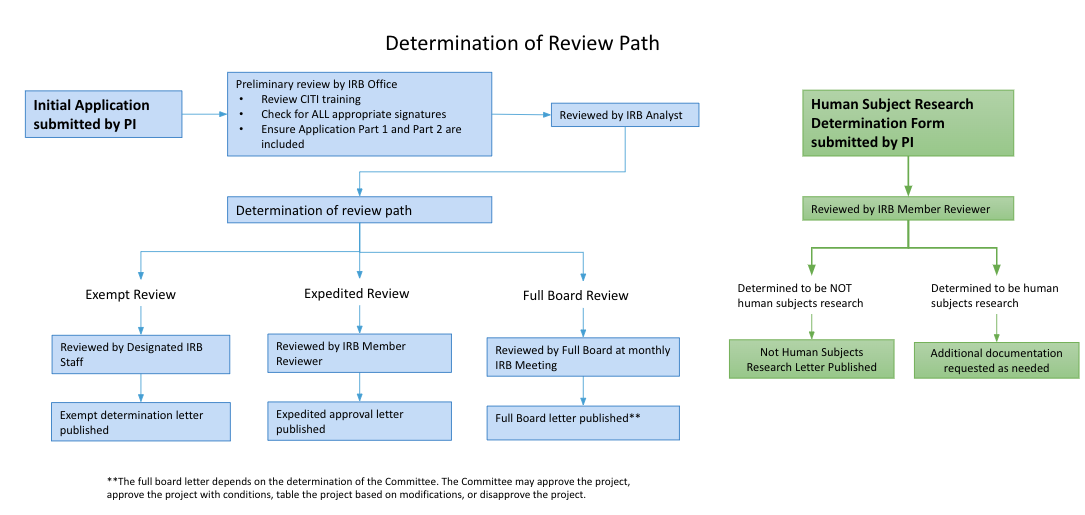
Human Subject Research Determination
If you are unsure if your project requires IRB review and approval, please download, complete, and submit the HSRD Form through IRBNet. You will receive an official determination confirming no IRB Approval is needed or additional information will be requested.
Exempt Review
To receive an Exempt Determination from the IRB, a protocol must fall into one or more of eight (8) federally-defined exempt categories. Examples of Exempt research are: anonymous surveys/interviews, passive observation of public behavior without collection of identifiable information, retrospective chart/record/data reviews, analysis of discarded pathological specimens without identifiers, etc.
Expedited Review
To qualify for an Expedited Review, research should fall into one or more of nine (9) federally-defined Expedited categories and present no greater than minimal risk to participants.
Full IRB Review
Protocols which do not meet either Exempt or Expedited review criteria will be added to the next available agenda for review at the fully convened IRB Meeting. Research activities presenting greater than minimal risk or transactions increasing the potential risk, will always be referred to the full convened IRB Meeting for review.
Submission Deadlines and Meeting Dates are available in the table at the bottom of this page.
IRB Composition
The IRB is a review committee consisting of faculty, students, staff, and outside members that has been established to help protect the rights and welfare of human participants participating in research. It is established to evaluate the ethical implications and conduct a risk-benefit analysis of research involving human participants through the application of 45CFR46 (Code of Federal Regulations governing human subject research).
For additional information regarding the review committee, the Office for Human Research Protections' (OHRP) provides the webinars listed below:
- IRB Review Criteria
- Quorum and Voting in IRB Meetings
- Membership Requirements for Institutional Review Boards (IRB)
Federalwide Assurance
FWA: 00005856
IRB Registration: IRB00000474
IRB Organization: 0000281
To check the expiration dates for these Assurances, please refer to the Department of Health and Human Services website for the Office for Human Research Protections(OHRP) database.
The University of Maryland College Park Federal Wide Assurance and the IRB registration are listed under "U of Maryland Coll Park Campus."
Standard Operating Procedures and Policies
This resource provides a detailed outline and thorough description of the Standard Operating Procedures that are specific to the UMD Office of IRB Operations:
IRB Office - Standard Operating Procedures (PDF)
This is the overarching University Maryland System Policy on Human Subjects of Research:
IV-2.10- UNIVERSITY OF MARYLAND SYSTEM POLICY ON HUMAN SUBJECTS OF RESEARCH
Full Board Meeting Dates and Deadlines
| Meeting Date | Application Submission Deadline |
|---|---|
| December 14, 2023 | November 26, 2023 |
| January 11, 2024 | December 26, 2023 |
| February 8, 2024 | January 21, 2024 |
| March 14, 2024 | February 25, 2024 |
| April 11, 2024 | March 24, 2024 |
| May 9, 2024 | April 21, 2024 |
| June 13, 2024 | May 26, 2024 |
| July 11, 2024 | June 23, 2024 |
| August 8, 2024 | July 21, 2024 |
| September 12, 2024 | August 25, 2024 |
| October 10, 2024 | September 22, 2024 |
| November 14, 2024 | October 27, 2024 |
| December 12, 2024 | November 24, 2024 |
| January 16, 2025 | December 29, 2024 |